
AI agents are revolutionizing the way modern companies work. From autonomous chatbots to intelligent data enrichment tools — AI is increasingly embedded in everyday SaaS processes. But when personal data is involved, automation comes with great responsibility. This is where GDPR compliance for AI agents comes into play: it ensures that every automated interaction respects users' privacy and meets the legal obligations under the GDPR.
The GDPR sets strict rules for collecting, processing, and storing personal data. When AI agents come into contact with this data — whether to respond to users, segment leads, or personalize experiences — they must meet the obligations of the GDPR.
Building an AI agent that is GDPR-compliant, however, is not a one-off task. It is a process that spans design, deployment, and monitoring.
One of the most important principles to consider from the start is privacy by design. Under the GDPR, this means that systems like AI agents must be built with data protection integrated into their structure, not added on afterwards. Compliance cannot be an afterthought. It must be embedded in the planning, design, and maintenance of the agent.
In this guide, we explain exactly what compliance means for AI agents, which legal and technical principles apply, and how to stay ahead in an increasingly regulated AI environment.
Do AI Agents Need to Be GDPR-Compliant?
Yes — if your AI agent processes personal data and you operate in the EU or target users in the EU, it must be GDPR-compliant.
An AI agent is a system that autonomously performs tasks based on inputs, logic, and training. Unlike static scripts, AI agents learn, adapt, and make decisions, often without explicit user intervention. In SaaS, these agents can take on tasks such as:
- Answering customer service inquiries
- Enriching CRM data
- Processing consent declarations
- Recommending content based on behavior
These agents frequently interact with personal data such as names, emails, behavioral logs, or IP addresses, often to deliver personalized services or insights. And since the GDPR defines personal data broadly, even the indirect processing of such data falls within the scope of the regulation.
That's why it is essential for companies to understand the compliance implications of deploying AI agents. In the next sections, we explain the principles and safeguards required to meet GDPR requirements effectively.
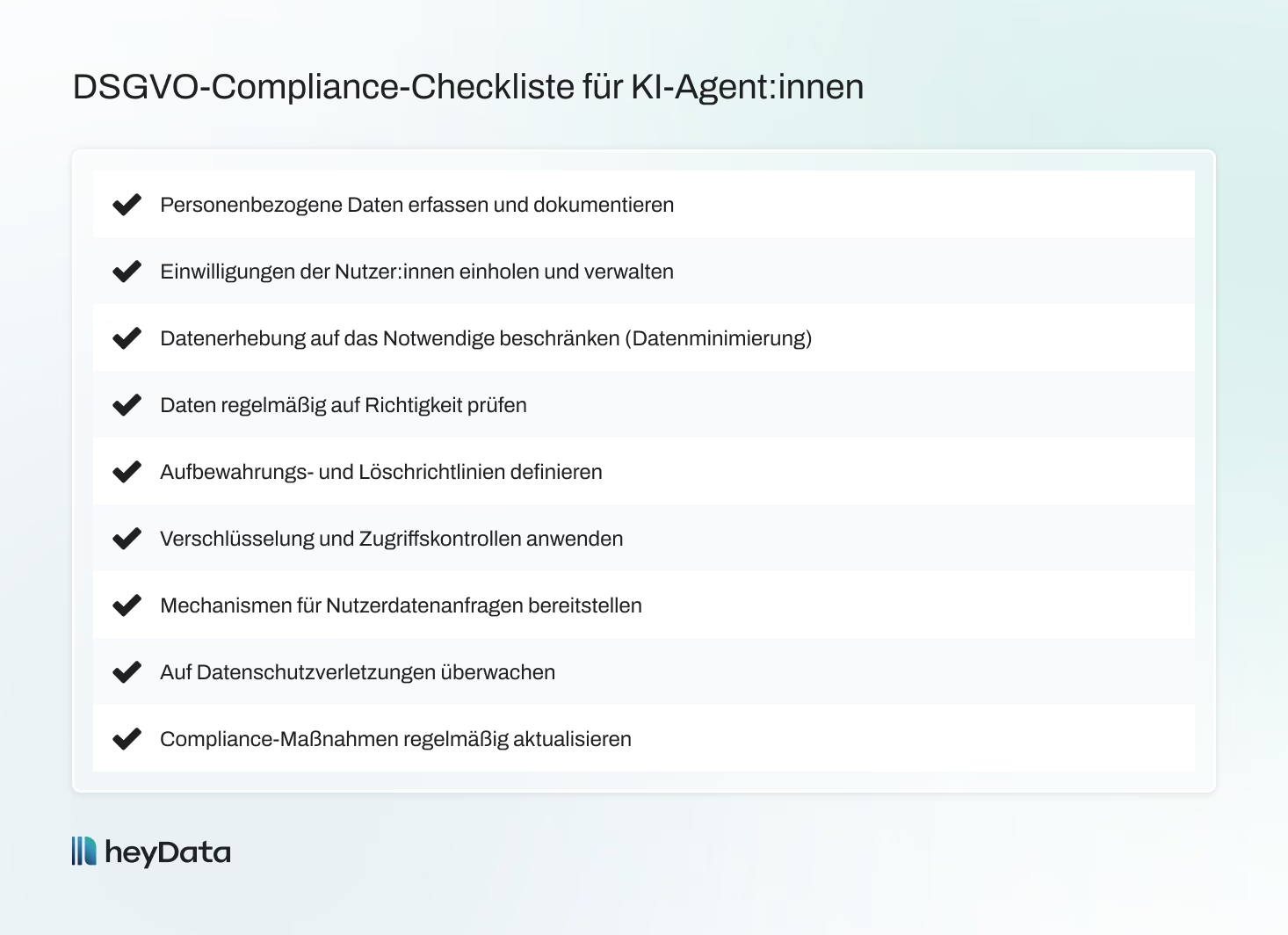
7 Core Principles of GDPR Compliance for AI Agents
For your AI agents to operate in a GDPR-compliant way, you need to embed the core principles of the GDPR directly into how they work.
1. Lawfulness, Fairness, Transparency
These principles ensure that AI agents process personal data with a legitimate purpose, in a fair manner, and in a way users can understand. Users should not only know that their data is being used — they should also understand how and why.
How to ensure compliance:
- Identify and document a valid legal basis for each type of data processing (e.g., consent, contract performance, legitimate interest).
- Your privacy policy must make clear when AI agents are involved, what data they use, and for what purpose.
- Clearly inform users when they are interacting with an AI system — e.g., "You are now chatting with our virtual assistant."
Example: An onboarding agent that accesses application data should display a short notice such as:
"This assistant uses the data you provide to guide you through the application process."
2. Purpose Limitation
Personal data may only be used for the original purpose for which it was collected. It must not be repurposed or used in other ways without a new legitimate purpose and new consent.
How to ensure compliance:
- Clearly define what the agent is for, and document this internally and in your privacy policy.
- Limit the agent's access to the data required for its core function.
- Avoid unnecessary integrations or feature expansions without a new review and transparency.
- Conduct regular audits to ensure no "purpose creep" has occurred.
Example: A support bot that handles tickets should not access marketing data unless users have explicitly consented.
3. Data Minimization
Only as much data as strictly necessary may be processed. This reduces risk and strengthens data protection.
How to ensure compliance:
- Give the agent access only to the data fields it genuinely needs for its function.
- Remove superfluous or sensitive fields (e.g., date of birth, phone number) if they are not strictly required.
- Regularly review data flows to avoid unnecessary collection.
Example: A password reset chatbot only needs the email address — not the full name, address, or purchase history.
4. Accuracy
The agent must work with correct data and must not draw false conclusions.
How to ensure compliance:
- Check input data for plausibility and currency.
- Create feedback loops so errors can be reported and corrected quickly.
- Schedule regular data updates for critical fields (e.g., job titles, contact details).
Example: A CRM agent should regularly update contacts' professional positions to avoid misjudgments.
5. Storage Limitation
Personal data must not be stored indefinitely.
How to ensure compliance:
- Set clear retention periods depending on the purpose of processing.
- Implement automated deletion mechanisms (e.g., deletion after 30 or 60 days).
- Explain retention periods to users in your privacy policy.
Example: If a chatbot stores conversations for training purposes, they should be automatically deleted after 60 days, for instance — unless users have consented to longer storage.
6. Integrity and Confidentiality
Make sure personal data is protected from unauthorized access, loss, or misuse.
How to ensure compliance:
- Use modern encryption (e.g., AES-256) for data at rest and in transit.
- Deploy role-based access controls (e.g., via identity & access management).
- Monitor the agent for suspicious activity.
- Isolate sensitive data in dedicated systems or databases.
Example: A recommendation agent must not have access to credit card data — secure segmentation is a must.
7. Accountability
You must be able to demonstrate at any time that your agents operate in a GDPR-compliant way.
How to ensure compliance:
- Record precisely when and how the agent processes data.
- Document the agent's decision logic, inputs, models, and learning processes.
- Regularly update DPIAs (Data Protection Impact Assessments), data flow diagrams, and risk assessments.
- Assign an internal person responsible for the agent.
Example: An AI agent that generates contract drafts should document exactly which data it uses and which versions were created when.
Respecting User Rights When Designing AI Agents
The GDPR grants individuals a set of rights over their personal data, such as the right to access, rectify, or delete their data, or to object to its use. AI agents must be designed so that these rights are preserved and users have mechanisms available to exercise them.
1. Right of Access (Art. 15)
Users have the right to know what personal data is collected, how it is used, and by whom — including the logic behind AI-driven decisions.
What you should do:
- Keep structured logs of the types of data the AI agent processes or generates.
- Create understandable data reports explaining what data is stored, for how long, and for what purpose.
- Explain (where relevant) how decisions are made — e.g., why a user is recommended certain content.
- Provide a web form or dashboard through which users can submit access requests.
2. Right to Rectification (Art. 16)
If personal data is inaccurate or incomplete, users can request a correction.
What you should do:
- Make sure data can be corrected and synchronized in real time.
- Prioritize correction requests — especially when incorrect data leads to poor decisions.
- Update models and decision logic when outdated data accumulates.
Example: If a user changes their job title, the AI agent should take this information into account for future recommendations.
3. Right to Erasure (Art. 17)
Also known as the "right to be forgotten": under certain conditions, users can request that their data be deleted.
What you should do:
- Implement complete deletion processes — including for logs, backups, and training data.
- Make sure deleted data is excluded from future model training.
- Provide a simple process for deletion requests — with timely confirmation to the data subject.
Example: If a customer requests deletion, the AI should no longer make recommendations based on their previous usage.
4. Right to Object (Art. 21)
Users can object to the processing of their data at any time, especially in the case of direct marketing or profiling.
What you should do:
- Provide opt-out options — directly within the user interaction.
- Respect "Do Not Track" signals or consent management settings.
- Adjust the agent's behavior when a user objects: no personalization, and anonymization of inputs where appropriate.
- Maintain system-wide objection lists.
Example: If someone objects to profiling, the recommendation agent should make generic rather than personalized suggestions.
5. Right Not to Be Subject to Solely Automated Decisions (Art. 22)
When decisions made without human involvement have legal or similarly significant effects, users may reject them or request human review.
What you should do:
- Openly disclose when an automated decision is involved — including the underlying logic.
- Offer a simple way to have decisions reviewed ("human in the loop").
- Provide an accessible appeals process (e.g., support channel, online form).
- Avoid fully automated systems in high-risk areas — unless there is a legal basis or consent.
Example: If an AI agent automatically rejects applicants, human review must be possible.
Ongoing Compliance & Monitoring
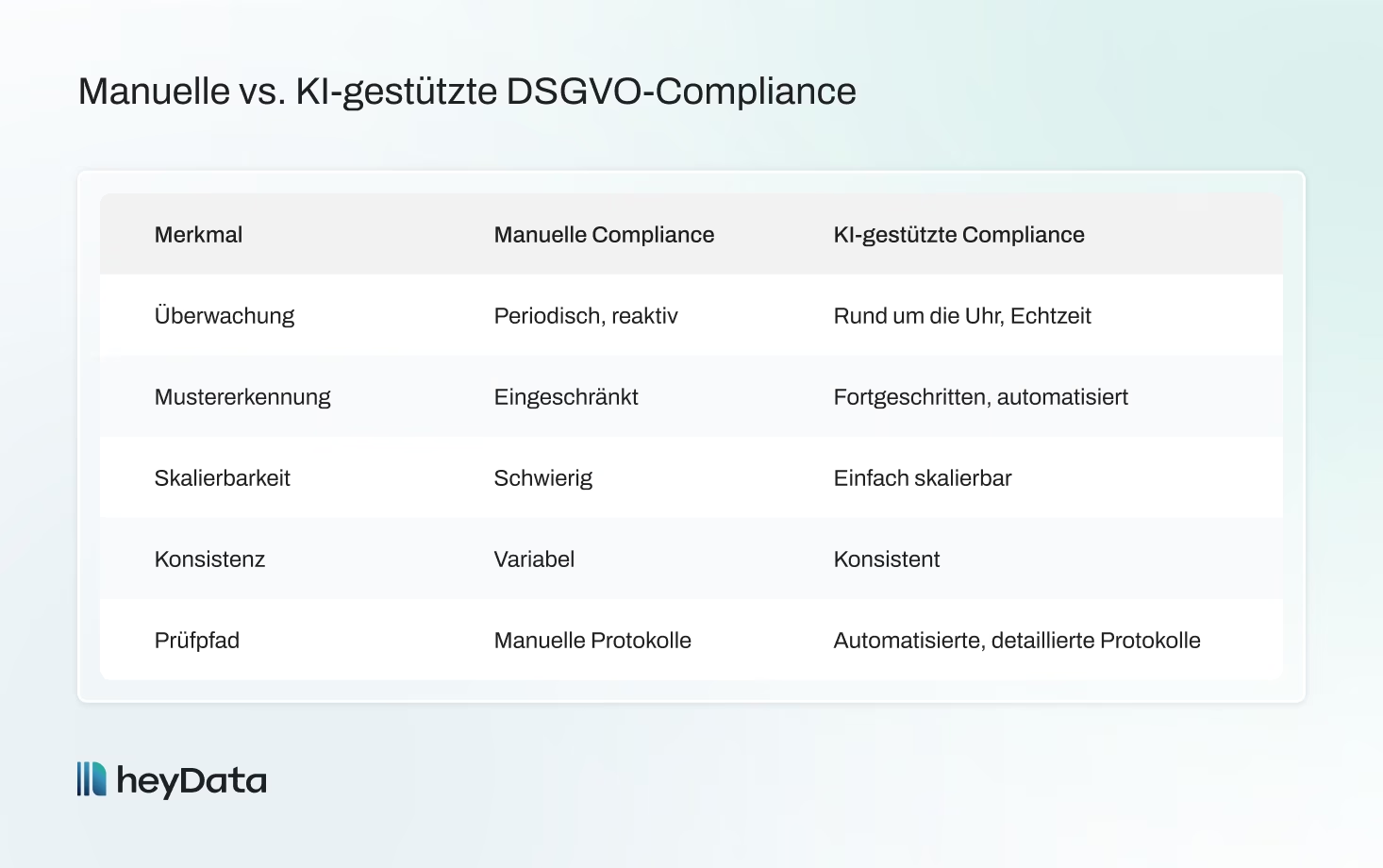
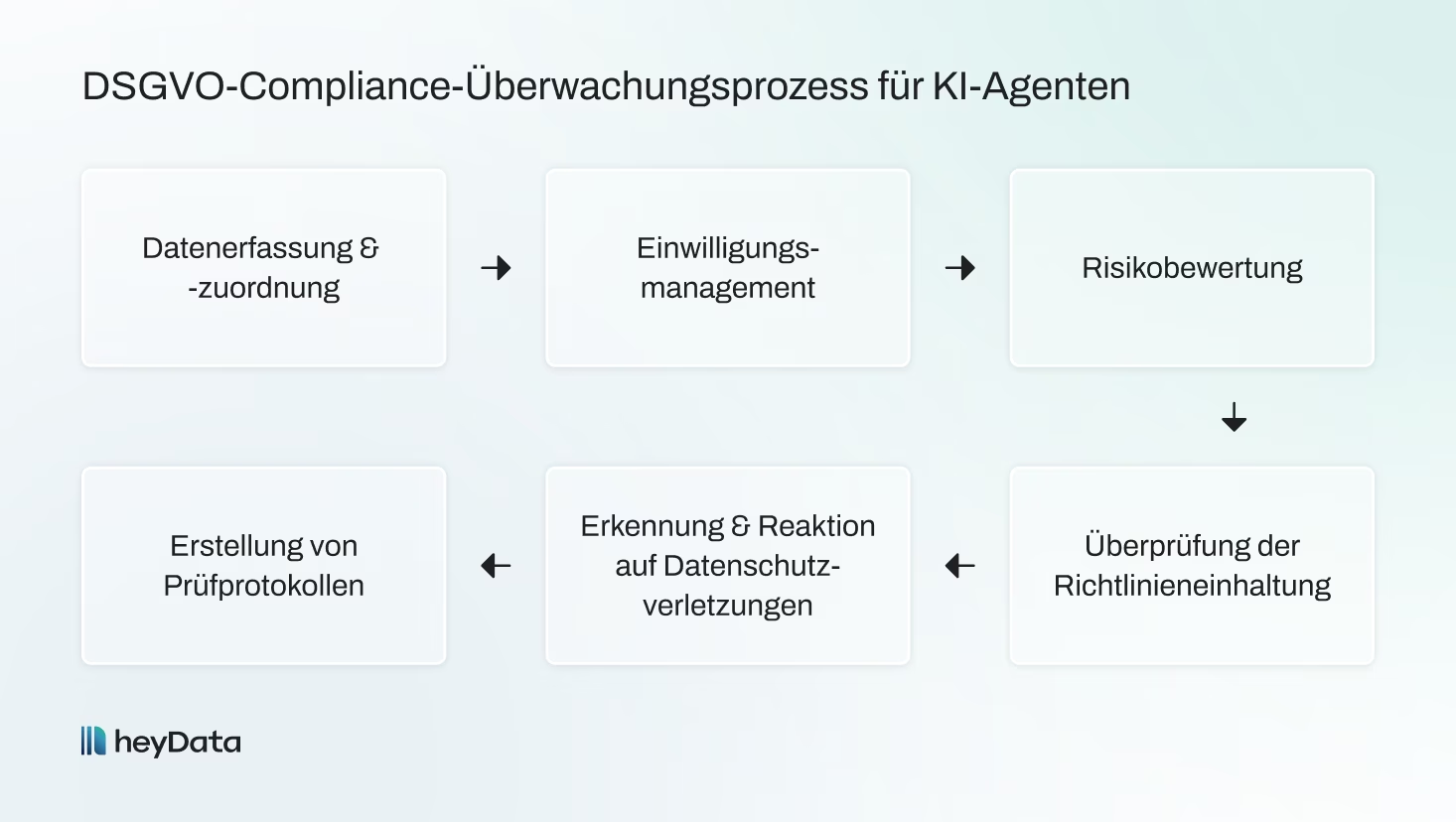
GDPR compliance doesn't end when an AI agent goes live. Continuous governance is necessary so that your systems continue to meet legal and ethical requirements as they evolve.
Vendor Risk & Processor Obligations
If your AI agent uses external APIs or services, these providers are considered data processors under the GDPR.
What you should do:
- Conclude a Data Processing Agreement (DPA) with every third-party provider.
- The DPA should govern: the purpose, nature, duration, and type of data processing, as well as security measures.
- Prefer privacy-friendly providers and conduct regular audits.
- Use a Vendor Risk Management tool (e.g., from heyData) to document risks and assess compliance.
Monitoring & Logging
Only through systematic monitoring can you demonstrate that your AI agents operate in a GDPR-compliant way.
What you should do:
- Record all relevant AI agent activities: data access, processing, decisions, errors.
- Store logs in a tamper-proof way, while observing storage limitations.
- Respond quickly to anomalies or security incidents.
- Keep your documentation up to date (data flow diagrams, DPIAs, risk assessments, etc.).
Preparing for the EU AI Act
The upcoming EU AI Act brings additional obligations, especially for high-risk AI systems (e.g., in HR, lending, healthcare).
What you should do:
- Check whether your AI agent falls under one of the AI Act's risk categories.
- Prepare for conformity assessments, transparency requirements, and risk management processes.
- Integrate AI Act requirements early — it saves effort on later changes.
- Remember: the EU AI Act complements the GDPR but does not replace it — both must be met.
Regular Updates
Compliance is a continuous process, not a one-off project.
What you should do:
- Schedule annual reviews of DPIAs, security measures, and data processing operations.
- Update training data and machine learning models responsibly.
- Inform teams and users transparently about changes in the AI agent's behavior.
- Keep an eye on new legislation (e.g., the ePrivacy Regulation) and adapt your governance accordingly.

Don't miss an update.
New laws, deadlines, and practical tips delivered straight to your inbox – once a month, no spam.
Conclusion
GDPR compliance for AI agents is complex — but absolutely necessary.
From legal basis, data minimization, transparency, and deletion routines to respecting user rights, monitoring, and vendor management: you carry responsibility that doesn't end at deployment.
The benefits:
- Reduced legal risk
- Stronger user trust
- Improved user experience
- A signal of responsible innovation
If you're ready to build AI systems that comply with the GDPR and the EU AI Act, heyData offers an All-in-One Compliance Solution with automated audits, DPIA templates, and vendor monitoring.
Request a personalized demo and start your compliance journey!
EU AI Act: Guide to AI Compliance | heyData
Learn what the EU AI Act requires of companies and how to manage AI risks, documentation, oversight, and governance in a structured way.

Free & no obligation
FAQ
What is AI agent GDPR compliance?
What is AI agent GDPR compliance?
It means that AI systems processing personal data meet the requirements of the GDPR, including legal basis, security, transparency, and user rights.
Does my AI agent need a DPIA (Data Protection Impact Assessment)?
Does my AI agent need a DPIA (Data Protection Impact Assessment)?
Yes, if the agent performs profiling, processes sensitive data, or makes automated decisions. The DPIA helps identify and minimize risks early on.
Are AI agents allowed to make automated decisions?
Are AI agents allowed to make automated decisions?
Only under certain conditions under Art. 22 GDPR, with consent, contractual necessity, or legal authorization. Human review must be possible.
How do I ensure my AI agent respects data subject rights?
How do I ensure my AI agent respects data subject rights?
Offer simple mechanisms for access, rectification, erasure, and objection. The agent must be able to adjust data processing when a right is exercised.
Which security measures are mandatory?
Which security measures are mandatory?
These include: TLS/AES encryption, role-based access, monitoring, logging, and anomaly detection. Sensitive data should be segmented and well protected.
How does the EU AI Act differ from the GDPR?
How does the EU AI Act differ from the GDPR?
The GDPR protects personal data. The EU AI Act regulates risk-based requirements for AI systems. High-risk agents must comply with both regulations.